
How to duplicate my resource?
The resource duplication feature allows you to quickly create a copy of an existing resource, so you can start from an already built foundation.
Where to find the duplication feature?
Resource duplication is available in the module settings, at the level of the relevant resource.
How to duplicate a resource?
To duplicate a resource:
- Open the resource you want to duplicate.
- Go to the module settings
- Click on « Duplicate »
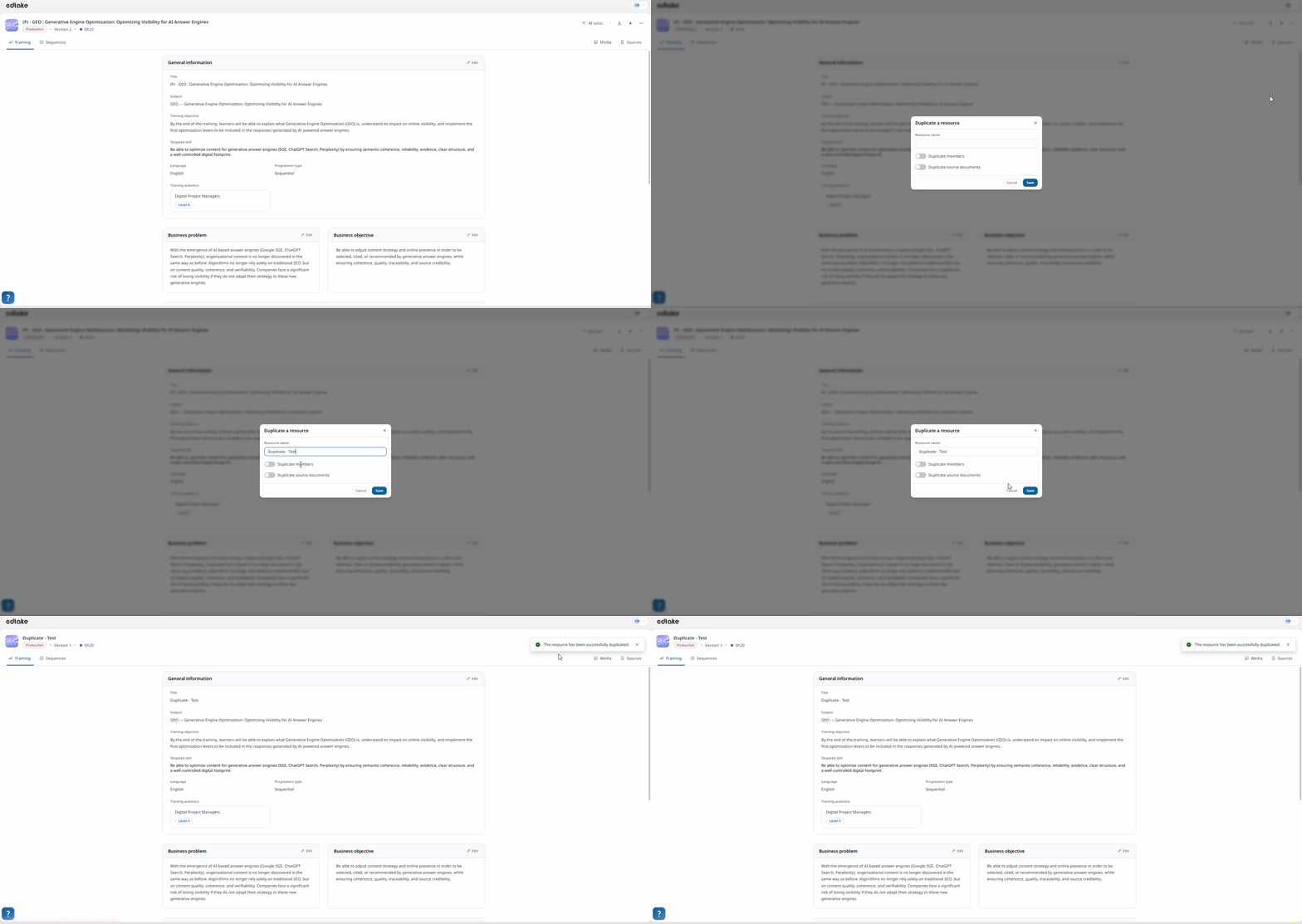
A window will then open, allowing you to configure the duplication.
In this window, you can:
- enter the name of the duplicated resource choose whether you want to
- assign the same members to this new resource;
- choose whether you also want to duplicate the source documents attached to the original resource.
Once the duplication is confirmed, the new resource is automatically created.
Where to find the duplicated resource?
After confirmation, your duplicated resource is available directly in your dashboardYou can then open it, modify it, and adapt it to your needs.
Why use resource duplication?
Resource duplication allows you to:
- save time in creating new content;
- keep an existing structure as a starting point;
- more easily reuse an already established framework;
- adapt a resource to a new context without starting from scratch.
Good to know
This feature is now available in early access. Activate it and test it today!